How to automate your GRC program? A guide
A strong governance, risk, and compliance (GRC) program is essential for any organization that wants to manage risks, meet compliance requirements, and ensure efficient operations. But keeping up with these needs manually? That’s a struggle. Today, manually managing GRC tasks just doesn’t cut it. The good news is that GRC automation can simplify compliance management, streamline risk assessments, and make governance a lot easier.
So, if you’re still relying on spreadsheets and manual processes, it’s time to rethink your strategy.
Let’s dive into how automating your GRC program can save time, reduce errors, and help your organization stay compliant without the headache.
Why automate your GRC program?
Manual GRC programs are time-consuming and prone to errors. With the pressure of staying compliant, it’s easy to overlook essential tasks, leading to penalties and reputational risks.
Automating your GRC program can help address these issues by:
- Reducing human error: An automated GRC program can help prevent mistakes that could otherwise happen with manual processes.
- Saving time: GRC automation allows teams to spend less time on repetitive tasks and more on strategic initiatives.
- Enhancing compliance: Automated GRC software ensures that processes follow regulatory guidelines, reducing non-compliance risk.
- Improving reporting: Automated reporting makes tracking and showcasing compliance, risk levels, and governance status easier in real time.
Let’s look at how you can automate each key area of your GRC program.
Quick link: What is healthcare cyber security?
Step 1: Automate governance processes
Governance is the foundation of any integrated GRC program, setting the rules and guidelines for how an organization operates. Automating governance processes can help establish a consistent framework, streamline approvals, and ensure everyone adheres to company policies.
How to automate governance
- Policy management: Use a centralized platform to manage and update policies. This will allow easy access for all employees and ensure everyone has the latest version. Automate policy updates and reminders so employees know when policies change and can review them on time.
- Approval workflows: Automate approval processes to ensure they follow a structured path and reduce delays. For instance, approvals for access to sensitive data can be automated to ensure only authorized personnel have access.
- Audit trail: An automated GRC platform can create audit logs for each action taken within the system. This builds accountability and provides a record for audits.
Step 2: Streamline risk management
Risk management identifies, assesses, and mitigates risks that could affect your organization. With automation, you can determine risks continuously, allowing you to respond quickly to any issues.
Automating risk management
- Risk assessment: Automated risk assessments can regularly evaluate risk levels across various departments. Use tools that automatically calculate risk scores based on data. This will make it easier to prioritize risks and take action.
- Continuous monitoring: Automated monitoring systems can detect unusual patterns or deviations in real time. This is especially useful for identifying potential threats before they become significant problems.
- Incident response: Automate incident reporting and response protocols. This includes alerting relevant team members, logging incidents, and tracking resolution steps.
Quick link: GRC predictions for banking and financial services
Step 3: Simplify compliance management
Compliance management is often one of the most challenging aspects of GRC, as regulations are constantly changing. Automated compliance tools such as CyberArrow GRC help keep your organization in line with regulatory requirements.
Automating compliance management
- Compliance tracking: Automated systems can monitor and track changes in relevant regulations. This feature lets you stay updated with the latest compliance requirements, helping you avoid penalties.
- Evidence collection: Manually collecting compliance evidence is time-consuming and can lead to missing documents. Automated systems collect and store evidence as compliance activities occur. These tools make it easy to retrieve documentation for audits or reporting.
- Audit management: Automate audit processes, including planning, scheduling, and reporting. This will make it easier to prepare for internal and external audits and reduce the time spent gathering data.
Step 4: Enhance reporting and analytics
Effective reporting is crucial for making informed decisions in GRC. With automation, you can streamline your reporting processes and improve accuracy.
Automating reporting and analytics
- Real-time dashboards: Automated GRC platforms often come with customizable dashboards that show real-time data. This allows stakeholders to monitor risk levels, compliance status, and governance metrics at a glance.
- Customizable reports: Automated reporting tools let you create customized reports tailored to different departments or stakeholders. Reports can include insights on policy compliance, risk levels, and other essential metrics, providing valuable insights for decision-making.
- Scheduled reports: Set up scheduled reports that automatically send updates to relevant team members or executives. This ensures everyone stays informed without the need for manual updates.
How to implement GRC automation
Automating a GRC program can feel like a big project, but breaking it down into steps makes it more manageable. Here’s a quick guide:
1. Assess your current processes
Review your current GRC processes to get a clear picture of what works and what doesn’t. For example, are compliance tasks taking up a lot of time? Are there gaps in tracking risk-related data? Mapping out each process will reveal areas that require streamlining, such as compliance tracking, risk assessment, policy management, and compliance audit preparations.
Document these findings to understand where automation can bring the most value clearly.
2. Choose an integrated GRC program
Look for a GRC platform that aligns with your organization’s needs regarding industry-specific compliance, scalability, and integration capabilities. The ideal GRC platform should be adaptable to your current environment and flexible enough to grow with your organization.
Additionally, consider ease of use and user support options, as a more user-friendly platform will make adoption easier for your team.
3. Prioritize high-impact areas
Once you’ve selected a GRC platform, automate the highest-impact areas first. Focus on time-consuming, error-prone, or critical processes for maintaining compliance. Common high-impact areas include compliance tracking, risk assessment, and incident reporting, as these often require frequent updates and extensive documentation.
4. Train your team
Schedule training sessions to familiarize team members with the platform’s functionality, including any custom workflows or reporting tools specific to your organization. This training should cover core aspects such as performing automated compliance checks, generating risk reports, and accessing audit trails.
Additionally, team members should know who to contact for support, whether an internal resource or the GRC provider’s customer service.
5. Monitor and Adjust
After rolling out the GRC automation, regularly monitor its performance to ensure it meets your objectives. Automation isn’t a set-it-and-forget-it solution; over time, you may need to tweak workflows, adjust risk parameters, or add new compliance requirements.
Use your GRC platform’s analytics to track metrics like compliance completion rates, incident response times, and audit preparation efficiency. Regularly review these insights with your team to identify any new areas for improvement and address potential gaps.
Quick link: CyberArrow vs. Scrut
Optimize your GRC program with CyberArrow GRC
CyberArrow GRC can help you streamline your GRC program, making it easier to manage governance, risk, and compliance. With CyberArrow, you’ll benefit from a platform designed to automate and simplify GRC processes, including:
- Automated compliance tracking: Stay up-to-date with regulatory changes and ensure compliance without manual intervention.
- Real-time risk monitoring: Detect potential risks in real time and respond proactively, reducing exposure to threats.
- Simplified audit management: CyberArrow makes it easy to prepare for audits with centralized documentation and automated reporting tools.
- Customizable dashboards and reporting: Get a real-time view of your organization’s GRC status with customizable dashboards that highlight key metrics.
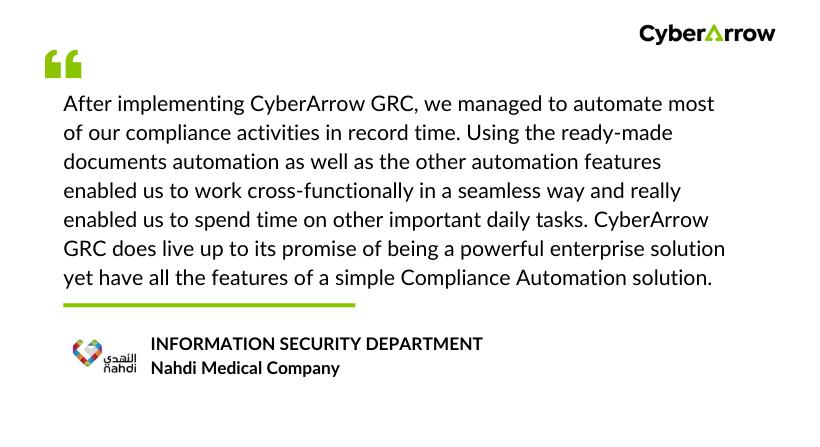
Read how Nahdi Medical Company streamlined compliance using CyberArrow GRC.
See what Nahdi says about CyberArrow: