How to make your website GDPR-compliant?
The General Data Protection Regulation (GDPR) is a regulation set by the European Union to protect the personal data of its citizens. Any business that collects, processes, or stores data from EU citizens must comply with GDPR, even if the business is not located within the EU.
Failure to comply can result in hefty fines, which can be as high as €20 million or 4% of your annual revenue, whichever is higher. Ensuring your website is GDPR-compliant is not just about avoiding penalties—it also helps build trust with your users.
In this guide, we will walk you through the steps needed to make your website GDPR-compliant, while keeping things simple and easy to understand. By following these steps, you will be better prepared to protect your users’ data and maintain compliance with GDPR.
- What does GDPR compliance mean for websites?
- Steps to make your website GPR-compliant
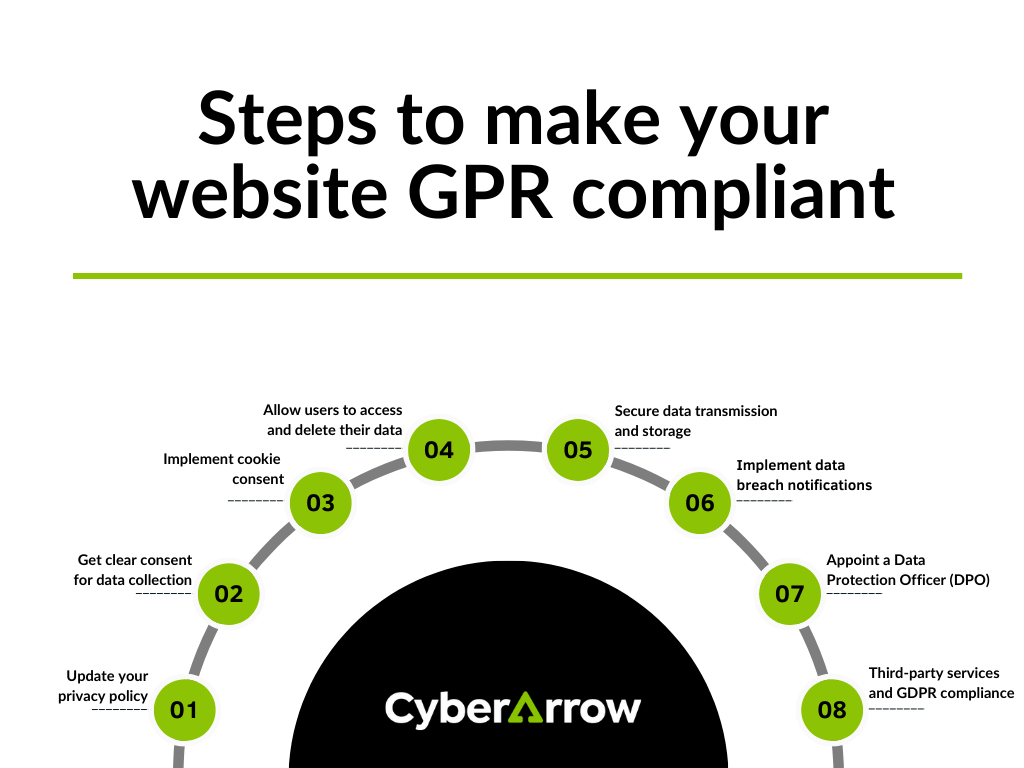
- 1. Update your privacy policy
- 2. Get clear consent for data collection
- 3. Implement cookie consent
- 4. Allow users to access and delete their data
- 5. Secure data transmission and storage
- 6. Implement data breach notifications
- 7. Appoint a Data Protection Officer (DPO)
- 8. Third-party services and GDPR compliance
- Common GDPR compliance mistakes to avoid
- Simplify GDPR compliance with CyberArrow GRC
What does GDPR compliance mean for websites?
When we talk about making a website GDPR-compliant, it means ensuring that your website meets the data protection standards required by the GDPR. This includes how you collect, store, and manage personal data, as well as how you communicate with your users about their rights regarding their data.
GDPR compliance for websites primarily focuses on:
- Collecting data in a lawful manner
- Allowing users to control their data
- Being transparent about how the data is used
- Protecting the data from unauthorized access
Now, let’s break down how to make your website GDPR-compliant.
Steps to make your website GPR-compliant
1. Update your privacy policy
One of the first steps toward GDPR compliance is updating your website’s privacy policy. The policy should clearly explain:
- What personal data do you collect
- How you collect and store the data
- Why you collect the data (for what purpose)
- How long the data will be retained
- How users can request to access, modify, or delete their data
Be sure to use simple, clear language in your privacy policy, and avoid legal jargon that could confuse your users.
2. Get clear consent for data collection
GDPR requires websites to obtain clear and explicit consent from users before collecting personal data. This means that you can no longer use pre-ticked boxes or assume consent. Instead, users must actively give their consent by ticking a box or selecting an option.
When asking for consent, you should also explain:
- Why you are collecting the data
- How the data will be used
- Whether the data will be shared with third parties
3. Implement cookie consent
Cookies are small files that track user activity on your website. Under GDPR, you must inform users if your website uses cookies and obtain their consent before placing cookies on their devices.
You can do this by displaying a cookie consent banner when users first visit your site. The banner should explain:
- What types of cookies are being used
- Why you are using cookies
- How users can manage or reject cookies
Make sure the user has the option to accept or reject different types of cookies (e.g., necessary, analytical, marketing).
4. Allow users to access and delete their data
One of the core principles of GDPR is that users should have control over their data. This means you need to provide users with the ability to:
- Access their data
- Modify their data
- Delete their data
Make it easy for users to exercise these rights by providing clear instructions on how they can contact you or request access to their data. You can set up a “Data Access Request” form or have a dedicated email address for these inquiries.
5. Secure data transmission and storage
GDPR requires businesses to take appropriate steps to protect the personal data they collect. This means using strong encryption to protect data during transmission (e.g., using HTTPS) and ensuring that stored data is secure.
To make your website GDPR-compliant, you should:
- Install an SSL certificate (this makes your website secure and shows a padlock icon in the browser)
- Regularly update your website software to prevent vulnerabilities
- Use secure storage methods to protect user data from unauthorized access
6. Implement data breach notifications
If your website experiences a data breach, GDPR requires that you notify the appropriate authorities and affected users within 72 hours. Having a data breach response plan in place is crucial for maintaining compliance.
Make sure your website has security measures in place to detect data breaches and that you have a process for reporting breaches when they occur.
7. Appoint a Data Protection Officer (DPO)
Depending on the size and nature of your business, GDPR may require you to appoint a Data Protection Officer (DPO). The DPO is responsible for monitoring compliance, advising on data protection matters, and acting as a point of contact for both the authorities and users.
Even if you’re not legally required to appoint a DPO, having someone in your organization responsible for GDPR compliance can help ensure that your website stays up-to-date with the regulations.
8. Third-party services and GDPR compliance
If your website uses third-party services like payment gateways, email marketing platforms, or analytics tools, you must ensure that these providers are also GDPR-compliant. This is because the personal data you collect may be shared with them.
Check the GDPR compliance status of any third-party providers you use, and make sure you have a data processing agreement in place with them.
Common GDPR compliance mistakes to avoid
Making your website GDPR-compliant may seem overwhelming, but avoiding common mistakes can make the process easier. Here are some pitfalls to watch out for:
- Not keeping records of user consent: Make sure to log and store proof of when and how users gave their consent.
- Ignoring updates to GDPR guidelines: GDPR is an evolving regulation, so stay informed about updates and adjust your practices accordingly.
- Not providing an easy opt-out option: Users should always have the ability to withdraw their consent or unsubscribe from marketing communications easily.
By avoiding these mistakes, you can stay compliant and avoid penalties.
Relevant read: PCI DSS vs GDPR
Simplify GDPR compliance with CyberArrow GRC
Making your website GDPR-compliant doesn’t have to be a daunting task. With CyberArrow GRC, you can simplify the entire process and automate up to 90% of the work involved in achieving compliance.
Here’s how CyberArrow can help:
Features of CyberArrow GRC for GDPR compliance:
- Automated evidence collection: CyberArrow automates the collection of evidence for GDPR controls, which saves you time and effort.
- Quick implementation: Implement GDPR quickly with powerful automation tools that streamline the process.
- Cross-standard mappings: Become certified against ISO standards effortlessly with our cross-standard mappings.
- Dedicated support team: Get a dedicated team that will work hand-in-hand with you throughout the implementation journey.
- Third-party assessments: Invite third-party assessors to conduct GDPR readiness assessments through the CyberArrow system for an objective review.
- Automated risk management: CyberArrow automatically manages your risk assessments, allowing you to stay on top of potential vulnerabilities.
- Powerful reporting dashboards: Upload your manual spreadsheets and take advantage of CyberArrow’s robust reporting dashboards for insightful data visualization.
- Pre-mapped risks and mitigations: The solution comes pre-mapped with over 300 risks and mitigations across GDPR and other standards, which makes it easier to address compliance requirements.
See what our clients have to say about CyberArrow GRC: