How should Government owned removable media be stored?
In today’s digital world, government agencies manage a massive amount of sensitive data, and removable media such as USB drives, external hard drives, and DVDs are commonly used to store and transfer this information. However, storing this data improperly can lead to significant security breaches, data theft, and unauthorized access. So, how should government owned removable media be stored securely?
In this blog, we will explore the best practices to protect this type of media and highlight the importance of following strict protocols.
Why is proper storage of removable media important?
Before diving into how government owned removable media should be stored, it’s essential to understand why it’s so important. Removable media often contain confidential information, and if mishandled or lost, the consequences can be severe:
- Data breaches: Government organizations deal with highly sensitive information like national security data, personal citizen information, and classified projects. Improper storage or loss of these devices can lead to breaches, putting public safety and privacy at risk.
- Compliance: Most governments have strict regulations and policies regarding data storage and protection. Failing to adhere to these guidelines can result in legal penalties.
- Cyber security risks: Removable media can be infected with malware or viruses if not stored securely, making it easier for hackers to access the government’s internal network.
Best practices for storing Government owned removable media
To ensure the safety of sensitive data, it’s important to follow these best practices when handling and storing government owned removable media:
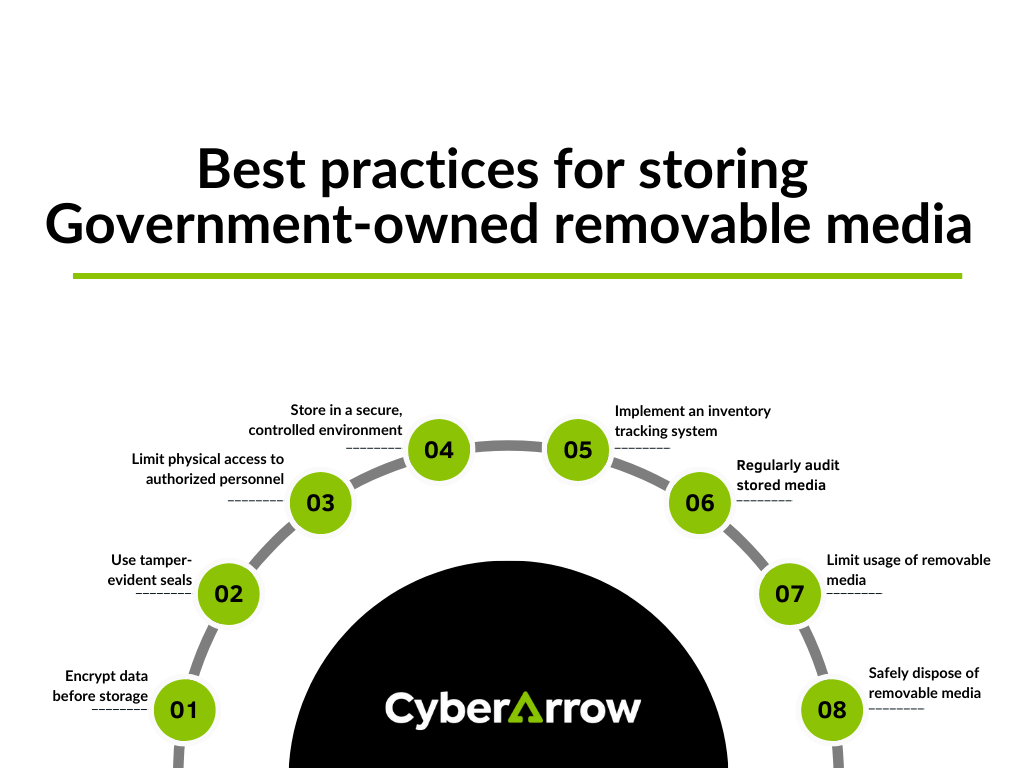
1. Encrypt data before storage
Encryption is one of the most effective ways to secure sensitive information on removable media. Encryption converts data into an unreadable format, so only authorized personnel with the decryption key can access it. Government agencies should use strong encryption algorithms to protect the data stored on removable media.
- Tip: Use encryption software that complies with government security standards. AES-256 encryption is one commonly recommended for sensitive government data.
2. Use tamper-evident seals
One of the most secure methods to protect removable media is by using tamper-evident seals. These seals provide a visual indication if someone has attempted to access the stored media, alerting the organization of possible security risks.
- Tip: Ensure the seals are compliant with your organization’s security protocols and inspect them regularly for signs of tampering.
3. Limit physical access to authorized personnel
Only authorized individuals should be allowed access to government owned removable media. This includes ensuring proper identity verification methods, such as employee badges or biometric access systems, are in place to restrict access.
- Tip: Create a list of individuals authorized to access removable media and ensure they undergo regular security training.
4. Store in a secure, controlled environment
Removable media should always be stored in a locked, secure environment when not in use. Cabinets or safes with strong physical locks can prevent unauthorized personnel from accessing or tampering with the media.
- Tip: Consider using storage environments with temperature and humidity control to prevent damage to the media itself.
5. Implement an inventory tracking system
Maintaining a detailed inventory of all removable media can help prevent loss and ensure proper accountability. Every time removable media is issued, returned, or accessed, it should be logged into the system.
- Tip: Use barcodes or RFID tracking systems to improve accuracy in monitoring the movement of removable media.
6. Regularly audit stored media
Conducting regular audits of stored removable media can help detect missing or unaccounted-for devices, allowing for swift corrective actions. Audits also ensure that data handling practices comply with government regulations.
- Tip: Schedule frequent audits, and during each audit, cross-reference inventory logs to ensure that all devices are present and accounted for.
7. Limit usage of removable media
Whenever possible, limit the use of removable media to essential functions only. Government agencies should encourage the use of secure cloud storage systems or encrypted internal networks to minimize the reliance on removable media.
- Tip: Implement policies that restrict employees from using personal removable media on government systems to reduce the risk of introducing malware.
8. Safely dispose of removable media
When government owned removable media is no longer needed, it should be disposed of securely. Merely deleting files is not enough; data must be fully wiped or destroyed to prevent any chance of recovery.
- Tip: Use government-approved data destruction methods such as degaussing (erasing magnetic fields) or physical destruction, such as shredding the media.
Common risks and challenges with removable media storage
While following best practices significantly reduces risks, several challenges come with storing government owned removable media:
- Human error: Employees may forget to encrypt data or misplace removable media, leading to security breaches.
- Malware: Removable media can be infected with malware, which can then spread to secure networks when connected to government systems.
- Unauthorized access: Without strict protocols, unauthorized personnel could gain access to sensitive information.
CyberArrow Awareness Platform for employee training
Despite having the best practices in place, human error remains one of the largest vulnerabilities in maintaining the security of removable media. All government employees must be trained to handle removable media correctly and understand the risks of mishandling such devices.
This is where CyberArrow Awareness Platform can make a significant difference. By offering an automated and comprehensive training solution, the CyberArrow Awareness Platform turns your employees into a human firewall, ensuring they are well-equipped to handle government owned removable media securely.
The platform can streamline the training process, track progress, and keep employees up to date with the latest cyber security protocols.
- Automated training: The CyberArrow Awareness Platform automates the entire training process, ensuring all employees receive the same high-quality information and guidance.
- Up-to-date education: With cyber security constantly evolving, the platform ensures employees are trained on the latest risks and how to mitigate them, including the proper storage and handling of removable media.
- Compliance management: The platform helps government agencies maintain compliance with their data security regulations, offering reporting and audit-ready documentation.
See what Silal has to say about CyberArrow Awareness Platform: