


What to do if you click on a phishing link
Phishing attacks are one of the biggest cyber security threats today. They trick people into clicking on harmful links, often disguised as emails or messages from trusted sources. These links can steal sensitive information, install malware, or even take control of your accounts. Many people realize they’ve clicked a phishing link only after it’s too late, leading to stress and security risks.
If you’ve clicked on a phishing link, don’t panic. There are steps you can take to minimize the damage and protect your data. Acting quickly can help prevent hackers from gaining access to your personal or work accounts.
In this guide, we’ll explain what happens when you click on a phishing link, what to do immediately, and how to secure your devices and accounts. We’ll also share ways to prevent phishing attacks in the future and introduce the CyberArrow Awareness Platform, a powerful tool for training employees and running phishing simulations to improve cyber security awareness.
- What happens when you click on a phishing link?
- What to do immediately after clicking a phishing link
- 1. Disconnect from the internet
- 2. Do not enter any information
- 3. Close the suspicious page
- 4. Scan your device for malware
- 5. Change your passwords
- 6. Enable Multi-Factor Authentication (MFA)
- 7. Report the phishing attack
- 8. Clear your browser cache and cookies
- 9. Monitor your accounts for suspicious activity
- How to prevent phishing attacks in the future
- How CyberArrow Awareness Platform helps protect your business
- Conclusion
What happens when you click on a phishing link?
Clicking on a phishing link can have different effects, depending on the attacker’s goal. Here are some possible outcomes:
1. You are taken to a fake website
The link may take you to a website that looks like a real bank, email service, or company login page. The site will ask you to enter your username, password, or other sensitive information. If you enter your details, the hacker can use them to access your account.
2. Malware or ransomware gets installed
Some phishing links download malware onto your device. This could be a virus, spyware, or ransomware that can:
- Steal your personal data
- Track your keystrokes
- Lock your files and demand ransom payments
3. Your device gets redirected to harmful sites
Sometimes, clicking on a phishing link can take you to unsafe websites that automatically install malicious software or collect your browsing data.
4. Attackers try to steal your financial information
If the phishing link leads to a fake banking page, hackers may trick you into entering your credit card details, PIN, or security questions.
If you click on a phishing link, follow these steps immediately to reduce the risk of damage.
What to do immediately after clicking a phishing link
1. Disconnect from the internet
If you click on a phishing link, immediately turn off Wi-Fi or disconnect from your network. This can stop malware from communicating with hackers.
2. Do not enter any information
If the phishing page asks for your login details or personal information, do not type anything. Close the page right away.
3. Close the suspicious page
Shut down the phishing website or application without interacting further.
4. Scan your device for malware
Run a full antivirus scan to check if any malicious software was installed. If your security software detects threats, remove them immediately.
5. Change your passwords
If you entered your login details on a fake website, change your password immediately for that account. Use a strong password that includes:
- A mix of letters, numbers, and symbols
- At least 12 characters
- A unique password (Do not reuse old passwords)
If you used the same password for multiple accounts, change them all to avoid further risks.
6. Enable Multi-Factor Authentication (MFA)
MFA adds an extra layer of security by requiring a second form of verification (like a code sent to your phone). Even if hackers get your password, they won’t be able to access your account.
7. Report the phishing attack
Report the phishing email or message to:
- Your IT or security team (if it happened at work)
- Your bank or service provider (if the attack involved financial fraud)
- Government agencies that handle cyber security reports
For example, in the US, you can report phishing to the FTC (Federal Trade Commission).
8. Clear your browser cache and cookies
Hackers can store tracking data in your browser. Clear your cache, cookies, and saved passwords to remove any malicious traces.
9. Monitor your accounts for suspicious activity
Keep an eye on your email, bank, and other online accounts for signs of unauthorized access. If you see anything unusual, report it immediately.
Quick link: Smishing vs phishing
How to prevent phishing attacks in the future
1. Train employees with Cyber Awareness Programs
Many phishing attacks target employees through fake work emails. Security awareness training teaches staff how to recognize and avoid phishing scams.
2. Be cautious with email links
Before clicking any link:
- Hover over it to see the real URL
- Check for spelling errors or unusual domains
- Verify the sender’s email address
3. Use a password manager
Password managers create and store strong, unique passwords for each account. This prevents hackers from accessing multiple accounts if one password is stolen.
4. Keep software updated
Ensure your operating system, browsers, and antivirus software are up to date to protect against security vulnerabilities.
5. Conduct phishing simulations
Phishing simulations test how well employees can detect fake emails. Running these tests regularly helps organizations identify weak spots and improve their security awareness programs.
How CyberArrow Awareness Platform helps protect your business
CyberArrow Awareness Platform is an advanced cyber awareness training solution that helps businesses educate employees about phishing attacks and test their ability to detect scams.
Key features of CyberArrow Awareness Platform
Automated cyber security training
- Educates employees on phishing, spear phishing, malware, and other threats
- Provides interactive and engaging lessons to improve knowledge
Real-time phishing simulations
- Sends fake phishing emails to test employee awareness
- Helps organizations measure their risk level
Easy reporting & analytics
- Tracks employee progress and identifies who needs more training
- Generates detailed reports for security teams
Compliance with security standards
- Supports compliance with NIST, ISO 27001, SOC 2, and other security regulations
By using CyberArrow Awareness Platform, businesses can reduce the risk of phishing attacks and improve overall cyber security.
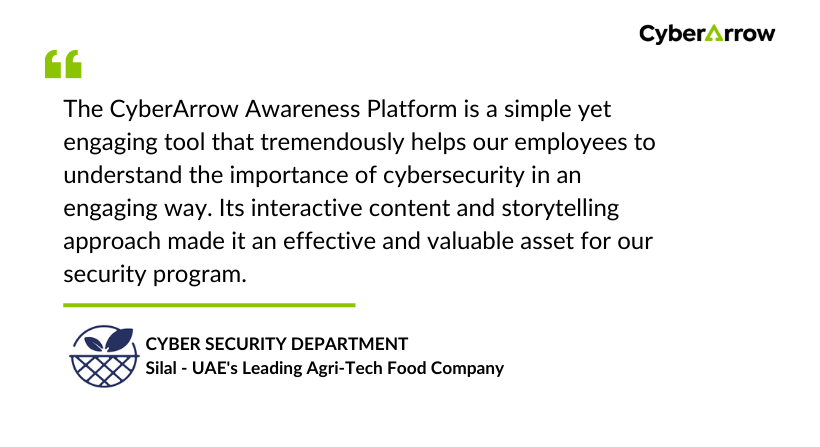
Read how CyberArrow awareness platform increased security awareness among Silal’s employees.
See what Silal has to say about CyberArrow Awareness Platform:
Conclusion
If you click on a phishing link, act quickly to protect your accounts, secure your device, and prevent further harm. Steps like changing your passwords, scanning for malware, and enabling multi-factor authentication can help reduce risks.
However, prevention is the best defense. Security awareness training and phishing simulations are essential to ensure employees recognize phishing attacks before they cause damage.
The CyberArrow Awareness Platform provides automated training and phishing simulations, helping businesses strengthen their cyber security defenses.
