

What is GRC compliance? A complete guide to GRC automation
In today’s business world, leaders must not only run operations but also manage rules, risks, and regulations. GRC compliance helps companies maintain good Governance, manage Risk, and follow Compliance in a clear and structured way. But what does it truly mean? And how can companies make it easier?
In this guide, we will explain what GRC compliance is, why it matters, the most important standards, and how CyberArrow GRC helps automate all these steps. By the end, you will see how compliance can be managed more smartly and leave spreadsheets behind.
- What is GRC compliance?
- Why GRC compliance matters
- Common GRC compliance standards
- The challenges of manual GRC compliance
- Key features needed for effective GRC compliance
- How CyberArrow GRC automates GRC compliance
- Benefits of automating GRC compliance with CyberArrow
- Real-world transformation
- Getting started with CyberArrow GRC
- FAQs about GRC compliance
What is GRC compliance?
GRC compliance means meeting internal and external rules across three connected areas:
- Governance: The rules and processes guiding company operations.
- Risk: Spotting and handling things that might go wrong.
- Compliance: Following laws, regulations, and standards.
When these are managed together, your company can act responsibly, avoid mistakes, and operate smoothly, even as rules change.
Why GRC compliance matters
Here are the key benefits of strong GRC compliance:
- Protect your reputation: Trust builds with consistent, visible compliance measures.
- Meet audit requirements: Staying ready for audits saves time and stress.
- Reduce risk: A complete GRC program helps find and control risks early.
- Improve decision-making: With clear policies, teams know who does what and why.
Common GRC compliance standards
Different industries face different rules. Here are the most common GRC compliance standards to know:
- ISO 27001: A global standard for information security management systems.
- NIST CSF: Cybersecurity guidelines by the U.S. National Institute of Standards and Technology.
- GDPR: EU privacy law protecting the personal data of EU citizens.
- HIPAA: U.S. law for safeguarding health information.
- PCI DSS: A standard for companies that handle card payments.
- SOC 2: A U.S. standard for service organizations’ data security.
- SOX: U.S. law ensuring financial transparency and audit controls.
- GLBA: U.S. law protecting consumers’ financial information.
- FISMA: U.S. federal standard for information security in government agencies.
- CCPA: California’s consumer privacy law.
These frameworks often overlap. Many controls can serve more than one compliance requirement.
The challenges of manual GRC compliance
Many businesses still manage GRC with spreadsheets and emails. This manual approach causes problems:
1. Duplication of work
Controls are entered separately for each framework, wasting time and effort.
2. Inconsistency
When documents aren’t tracked carefully, outdated or conflicting versions appear.
3. Low visibility
Without dashboards, teams don’t know what’s due or what’s failing.
4. Risk of errors
Manual entry leads to missed tasks and overlooked risks.
5. Audit difficulties
Finding evidence manually takes days or weeks.
6. Sluggish response
Updating policies or responding to new rules is slow and error-prone.
Clearly, manual GRC compliance does not scale, and it doesn’t help you stay ready.
Key features needed for effective GRC compliance
Here’s what modern organizations need to manage compliance effectively:
- Centralized control tracking: A single view of all controls and who owns them.
- Risk assessment tools: Easy ways to score and track risk.
- Policy management software: Create, distribute, and track policies.
- Compliance mapping: Link controls to multiple standards and frameworks.
- Evidence collection: Store proof easily without manual gathering.
- Automated reporting: Generate audit-friendly reports with one click.
- Alerts & reminders: Stay on top of tasks with automatic notifications.
- Real-time dashboards: See compliance health at any time.
- Audit logs: Track who did what and when for accountability.
How CyberArrow GRC automates GRC compliance
CyberArrow GRC is a full-featured Enterprise GRC platform that helps teams automate GRC compliance. Here’s how it addresses each need:
Centralized control tracking
- Access a master list of all controls mapped to owners, business units, and standards.
- Update once, apply everywhere.
Risk assessment tools
- Built-in risk scoring with visual tools like heatmaps.
- Automatic updates and scaling.
Policy management
- Use templates to build policies quickly.
- Share, track acknowledgment, and update all in one system.
Compliance mapping
- Map each control to ISO, NIST, GDPR, HIPAA, PCI DSS, and more simultaneously.
- Avoid repeating the same control for different standards.
Evidence collection
- Upload audits and scan log files into one place.
- Tag evidence to multiple standards and controls.
Automated reporting
- Generate audit-ready reports automatically, not from scratch.
- Show scope, evidence, and history with ease.
Alerts & reminders
- Automated alerts for deadlines, risks, and policy review.
- Keeps compliance tasks visible.
Real-time dashboards
- Monitor compliance posture instantly.
- Include risk, policy, control, and audit metrics.
Audit logs & accountability
- Capture user actions, changes, and acknowledgments in a built-in log.
- Detail who did what with full accountability.
Benefits of automating GRC compliance with CyberArrow
Here are the major gains from switching to CyberArrow GRC:
- Time savings: Automate admin tasks and reduce manual work.
- Accuracy: One source of truth eliminates errors.
- Scalability: Easily add new frameworks as your business grows.
- Audit readiness: Evidence is stored and tagged automatically.
- Executive visibility: Dashboards offer real-time snapshots.
- Better risk management: Live assessments and remediation tracking.
- Cross-framework efficiency: Use cross-mapped controls to save time.
Real-world transformation
Imagine the change:
- Launch GRC compliance projects in weeks, not months.
- Reduce manual hours by automating tasks and controls.
- Get ahead of audits with always available documentation.
- Respond to new regulations swiftly with auto-mapping.
- Build trust through consistent, visible compliance controls.
Getting started with CyberArrow GRC
Follow these steps to move away from manual GRC compliance:
- Audit your current GRC state: Inventory frameworks, controls, policies, owners, and current tools.
- Define priorities: Decide which standards (ISO, NIST, GDPR, etc.) matter most now.
- Implement CyberArrow GRC: Load your data, use cross-mapping, and assign owners.
- Engage and train stakeholders: Ensure departments know how to use and own their areas.
- Monitor and iterate: Use reports and dashboards to spot issues and optimize processes.
- Scale over time: Add new frameworks, regions, or business units as you grow.
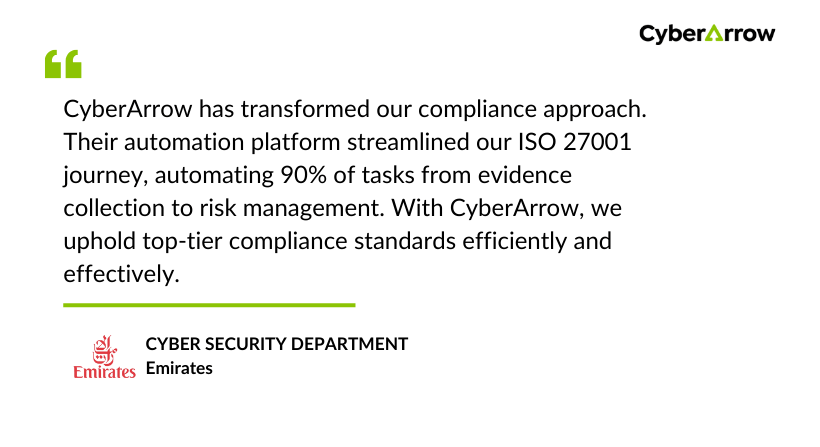
Read how Emirates enhanced Information Security by automating ISO 27001 with CyberArrow GRC.
See what Emirates has to say about CyberArrow GRC:
FAQs about GRC compliance
Can I still use spreadsheets?
Spreadsheets can support smaller efforts, but they don’t scale and are error-prone.
Do we need dedicated GRC software?
Yes. Automation boosts efficiency, accuracy, and readiness, especially at scale.
What frameworks can CyberArrow support?
CyberArrow supports ISO 27001, NIST, GDPR, HIPAA, PCI DSS, SOC 2, SOX, and more.
How long does it take to implement?
Most teams go live in just a few weeks, not months.
Final thoughts
GRC compliance is no longer optional, it’s a core part of running a modern business. But manual methods are slow, messy, and risky.
With CyberArrow GRC, teams can:
- Automate governance, risk, and compliance tasks.
- Map controls across multiple standards in one go.
- Stay audit-ready with real-time dashboards and reports.
- Scale easily as new frameworks or growth demands emerge.
Stop relying on spreadsheets and take control of your compliance. Move to a smarter, more secure future with CyberArrow GRC.
